Best Community Website Examples (And Why They Convert)

We scored 18 community homepages on 60+ conversion criteria. See which sections separate the top performers, and what your page is probably missing.

Updated April 202618 pages analyzed
#CompanyScore

Scored by AI across 60+ conversion criteria

Wavmaker landing page
#1
76/100
Scroll to explore
Analyze your community pageFree. Takes 2 minutes.

What the best community websites get right

Community pages have to make an intangible product, belonging, connection, access, feel concrete enough to act on. The strongest pages in this benchmark do four things consistently:

48.2/100

Avg. page score

Highlights

  • Make the value tangible in the first viewport. The best community pages translate abstract belonging into a specific benefit the visitor can picture.
  • Show who is already inside. Surface member counts, recognizable faces, or activity feeds so visitors see proof of a living community before they join.
  • Offer a low-risk first step. Free tiers, trial periods, or instant previews reduce the commitment gap between curiosity and membership.
  • Segment by intent, not just feature. Route creators, members, and buyers to distinct paths so no one has to parse messaging built for someone else.

6 best community websites analyzed in detail

Each company below is paired with its strongest section and scored across 60+ conversion criteria. See what they get right, and what you can borrow for your own community homepage design.

01

BeamlyA community platform that lets buyers compare, evaluate, and decide on their own terms.

Editor's pick72/100
Gabriel AmzallagGabriel AmzallagFounder, LPA

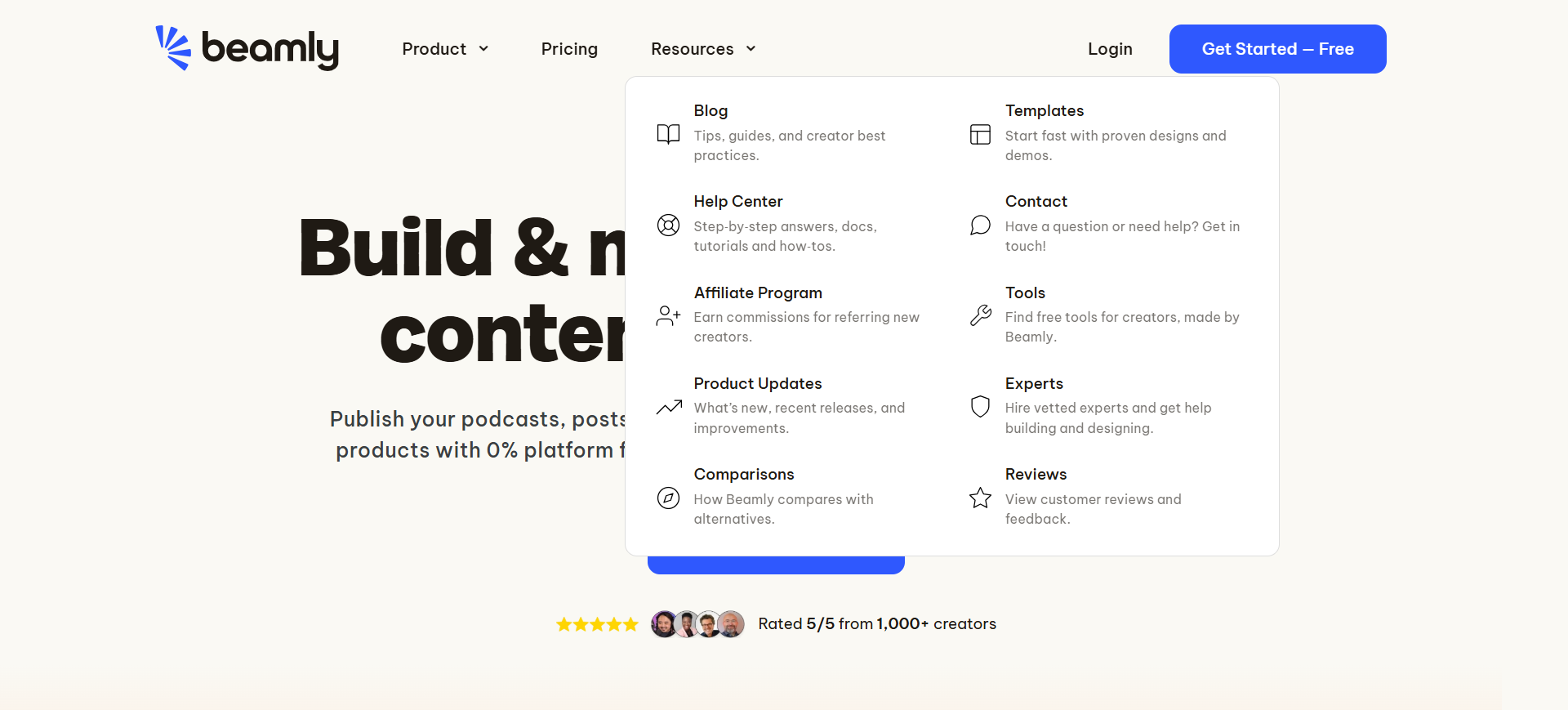
Beamly's navbar (scored 100, top-scoring) sets the standard for community platform navigation. A resources mega menu with ten items and icons across two columns gives evaluators immediate depth, while a high-contrast Get Started Free CTA and visible Pricing, Comparisons, and Reviews links let buyers self-direct their evaluation without friction.

What makes this page stand out

  • Key features and capabilities are highlighted upfront: creator discovery, campaign management, content approval workflows, and performance analytics — the full brand-creator collaboration lifecycle
  • The product explanation makes the workflow tangible: brands find creators, brief them, review content, approve deliverables, and measure results — all within one platform
  • Creator economy positioning taps into a massive growth market where brands are shifting budget from traditional advertising to influencer and creator partnerships at an accelerating rate
  • The brand-side focus (helping brands manage creator relationships) rather than creator-side (helping creators monetize) creates a clearer monetization model: brands have bigger budgets than individual creators

Section we love

·NavbarBest in class
Beamly Navbar section
  1. 1Resources mega menu organizes ten items with icons across two columns for easy scanning
  2. 2Get Started Free CTA button is large and styled with strong contrast in the nav
  3. 3Pricing tab is visible as a direct link in the top-level navigation
  4. 4Menu includes Comparisons and Reviews links to help buyers evaluate the product
02

MembershipMembership pricing that guides buyers by growth stage, not feature count.

70/100
Gabriel AmzallagGabriel AmzallagFounder, LPA

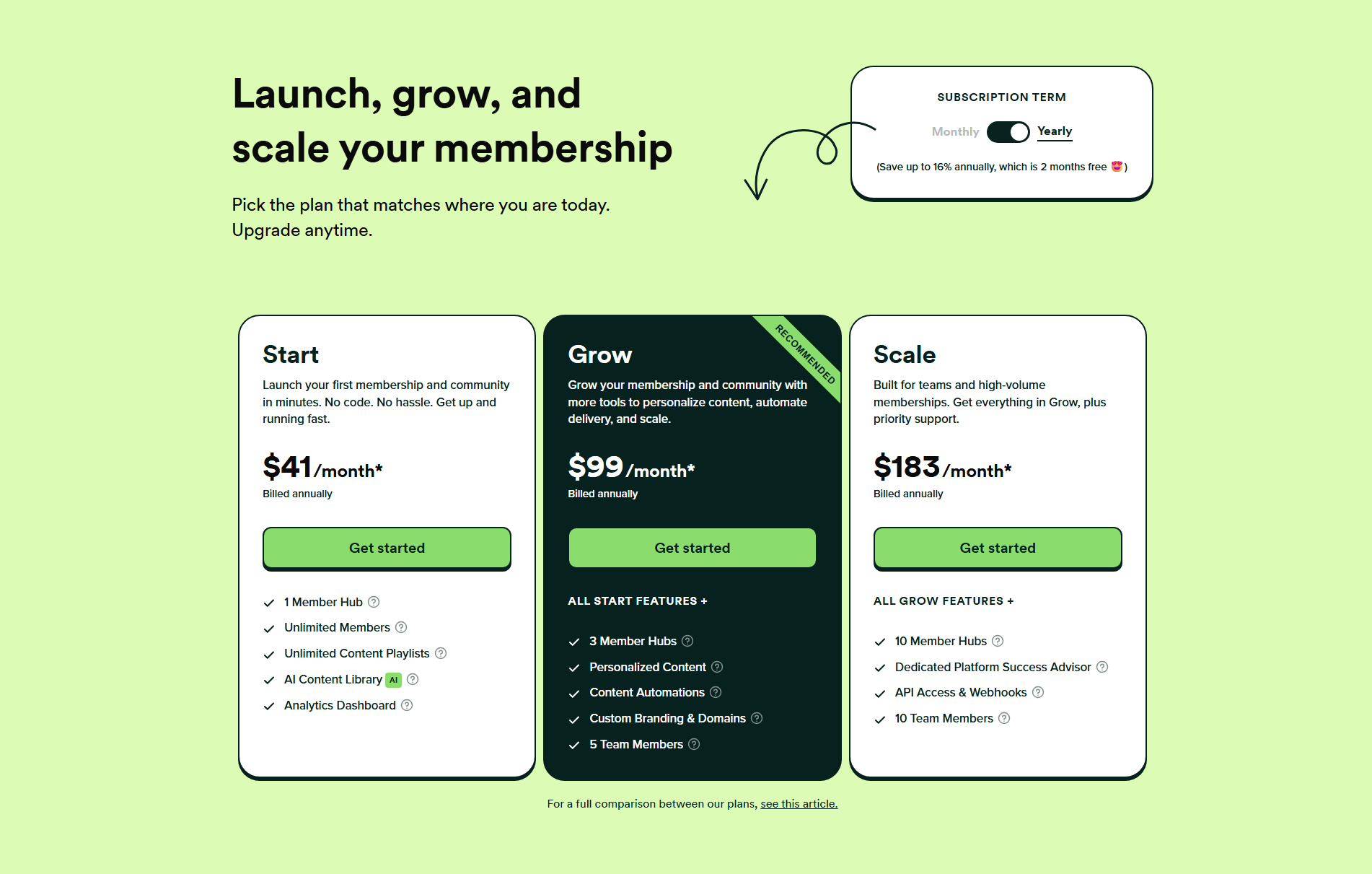
Membership's pricing section (scored 71) maps plan names to the buyer journey (Start, Grow, Scale), so visitors self-select by stage rather than parsing feature tables. A monthly-to-yearly toggle showing 16% savings and 2 months free, a Recommended badge on the Grow tier, and info icons on features reduce comparison friction across the board.

What makes this page stand out

  • The specific problem articulation — creators struggling to retain members and reduce churn — positions the platform around the business model's core challenge, not just content delivery
  • Competitive differentiation against specific alternatives (Patreon's limited tools, WordPress's complexity, all-in-one platforms' bloat) helps buyers self-select quickly
  • The all-in-one membership toolkit (content library, community, courses, mobile app) covers every element a membership business needs without requiring multiple subscriptions
  • Engagement and retention features (drip content, gamification, progress tracking) directly address the churn problem that kills most membership businesses within the first year

Section we love

·Pricing
Membership Pricing section
  1. 1Start, Grow, Scale names map to the buyer journey clearly
  2. 2Monthly to Yearly toggle shows 16 percent savings (2 months free)
  3. 3Recommended badge on Grow steers most buyers to the mid tier
  4. 4Info icons next to every feature let buyers learn without leaving
  5. 5Each plan describes its ideal user in plain language under the name
03

GourmetProAn expert marketplace that makes the hiring timeline feel concrete and real.

55/100
Gabriel AmzallagGabriel AmzallagFounder, LPA

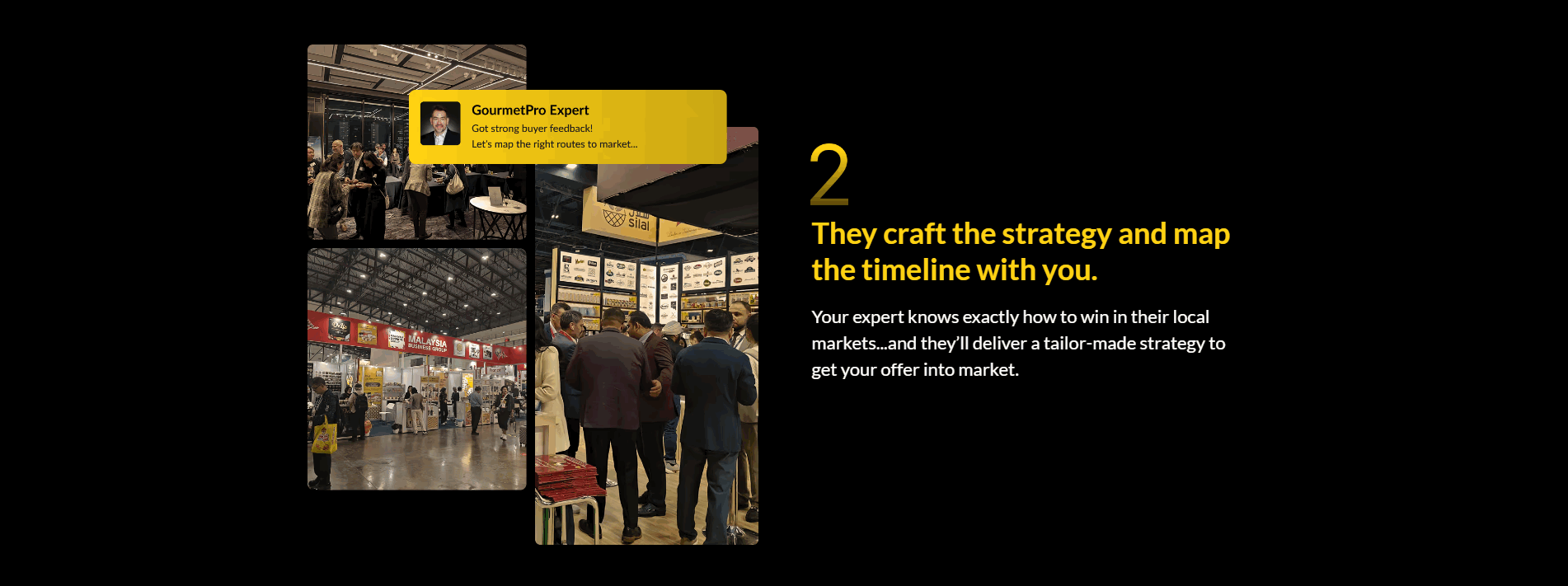
GourmetPro's how-it-works section (scored 100, top-scoring) addresses the buyer's key concern (timeline), directly in the heading. An expert chat overlay simulates real interaction, and a trade event photo adds authenticity that stock imagery cannot match.

What makes this page stand out

  • Expert cards featuring professionals from Unilever, Subway, PepsiCo, Coca-Cola, DHL, General Mills build instant credibility
  • Industry-specific positioning (food & beverage only) signals deep domain expertise over generic consulting
  • "Local F&B experts guide your global expansion from game plan to execution" — end-to-end service promise
  • Logo bar with recognizable global F&B companies (Domino's, CJ, Associated British Foods) validates market reach

Section we love

·How It WorksBest in class
GourmetPro How It Works section
  1. 1Heading explicitly mentions mapping the timeline which addresses a key buyer concern
  2. 2Expert chat overlay (lets map the right market strategy) simulates real interaction
  3. 3Photo of a trade event adds authenticity and shows the real-world context of the service
04

BloomerangDonor management software that shows what it does before asking you to sign up.

54/100
Gabriel AmzallagGabriel AmzallagFounder, LPA

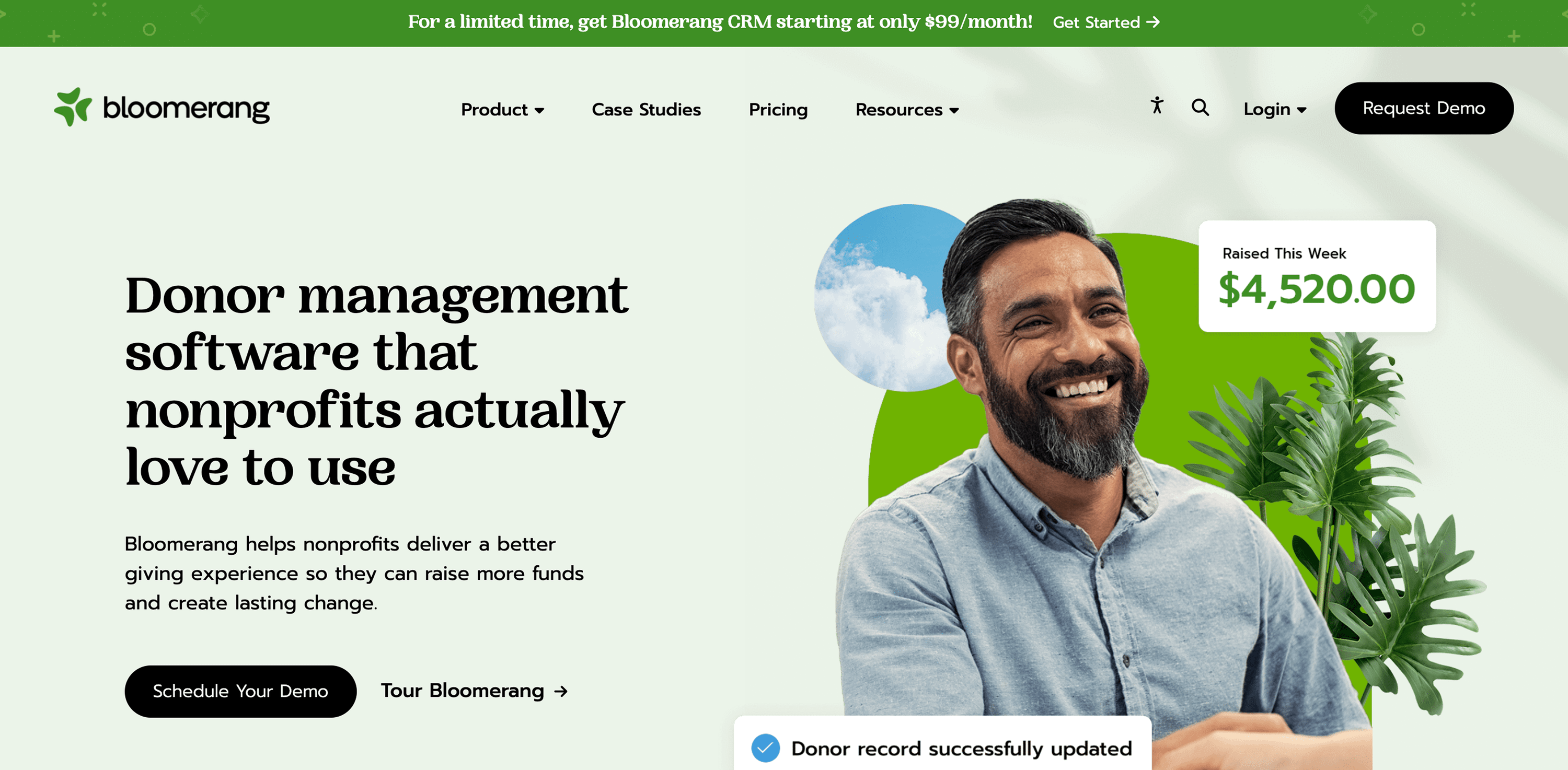
Bloomerang's hero (scored 56) packs density into a first viewport that many donor management pages leave sparse. Dual CTAs (Schedule Demo and Tour Bloomerang), live product snippets showing Raised This Week and donor record updates, and a $99/month promotional banner give nonprofits both proof and price in one view.

What makes this page stand out

  • Donor retention tools and engagement scoring help nonprofits keep supporters active
  • Online giving and payment processing streamline the donation experience
  • Email marketing and communication tools create donor outreach capabilities
  • Reporting and analytics help nonprofits understand their fundraising performance

Section we love

·Hero
Bloomerang Hero section
  1. 1Dual CTAs (Schedule Your Demo and Tour Bloomerang) offer guided and self-serve exploration paths
  2. 2Product snippets (Raised This Week 4520 dollars, Donor record updated) show real nonprofit data in context
  3. 3Headline (Donor management software that nonprofits actually love to use) nails category plus audience in one line
  4. 4Promotional banner (starting at 99 dollars per month) adds urgency and price transparency above the fold
05

InmemoriMemorial services that reduce friction through local specificity and time transparency.

53/100
Gabriel AmzallagGabriel AmzallagFounder, LPA

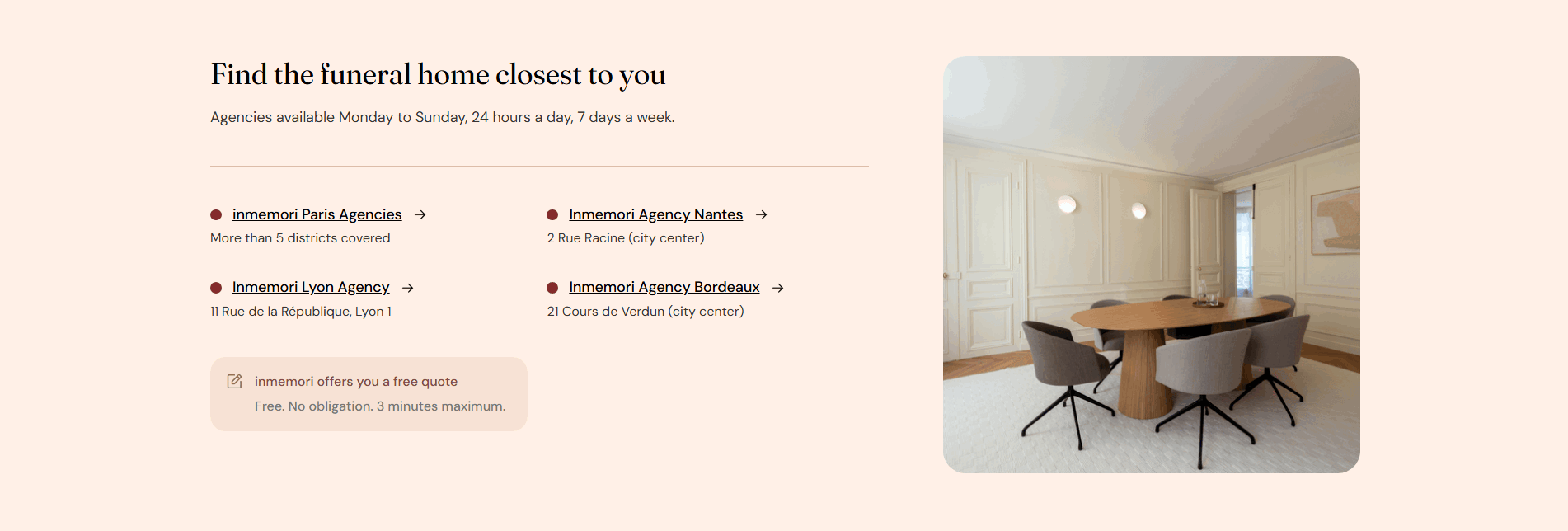
Inmemori's value proposition section (scored 67) solves for geographic trust in a high-emotion category. City-level agency links reduce decision friction, a free quote CTA promising 3 minutes maximum sets time expectations, and 24/7 availability signals reliability when it matters most.

What makes this page stand out

  • "Obsèques de qualité à partir de 3 000€" (Quality funerals from €3,000) creates transparent pricing in an industry known for opaque costs
  • Three key reassurances — prélèvement possible, démarches gérées à 100%, équipe 24h/7j — address the top anxieties of grieving families in one glance
  • Four-step accompaniment journey (call → advisor meeting → ceremony → burial/cremation) demystifies a process that families dread navigating alone
  • Multiple agency locations (Paris, Nantes, Lyon, Bordeaux) with 24/7 availability demonstrate national coverage and always-on support

Section we love

·Value Proposition
Inmemori Value Proposition section
  1. 1Concrete city-level agency links with addresses reduce friction and build local trust for bereaved families
  2. 2Free quote CTA with 3 minutes maximum time commitment lowers perceived effort and encourages action
  3. 324/7 availability across Monday-Sunday signals reliability during emotionally urgent decision-making moments
  4. 4Multiple distinct location options give visitors a sense of geographic coverage and accessibility
06

RuulFreelancer payments with a contact experience that respects the visitor's time.

53/100
Gabriel AmzallagGabriel AmzallagFounder, LPA

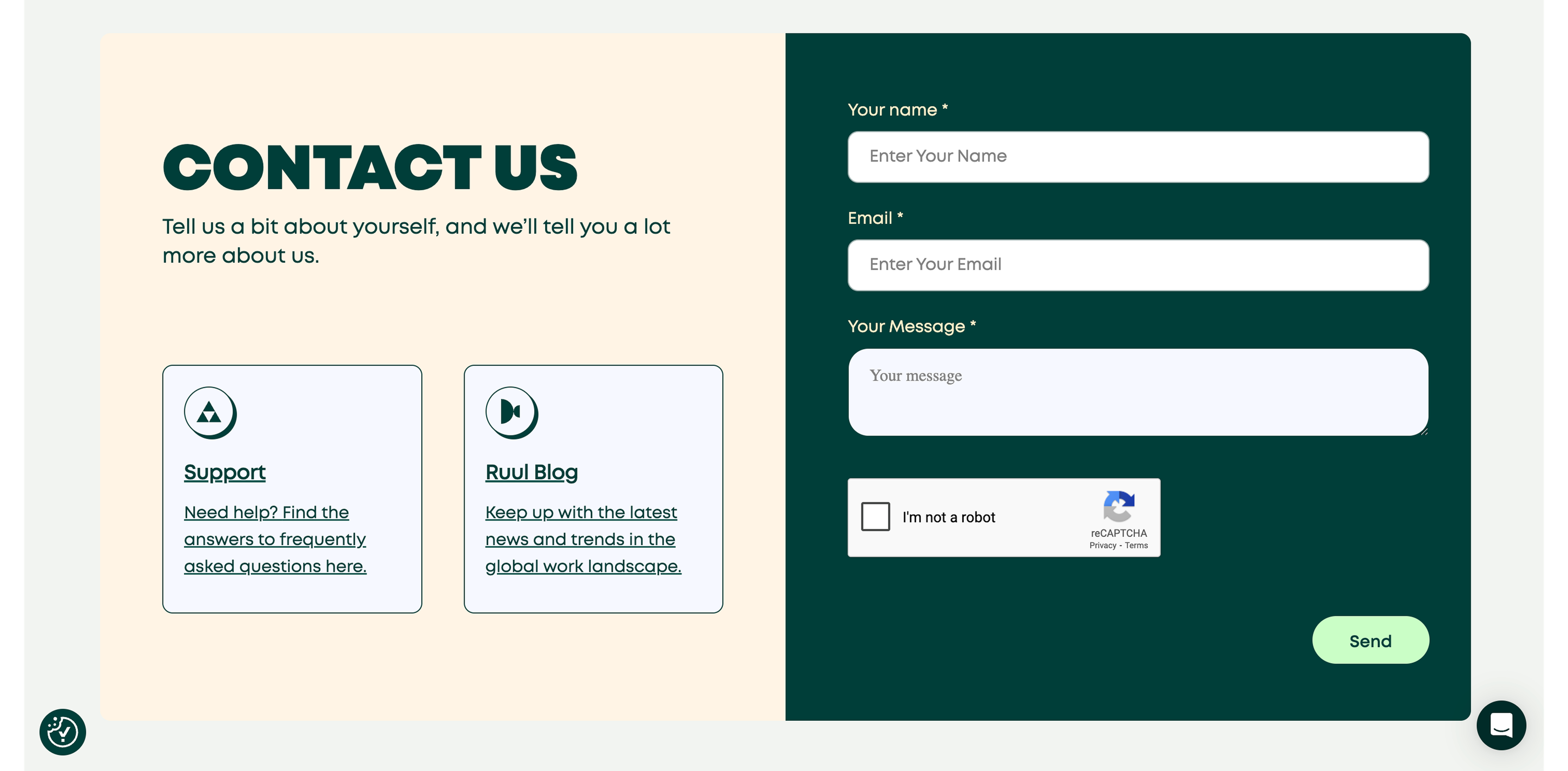
Ruul's contact section (scored 67) strips away unnecessary barriers. A minimal 3-field form, a live chat widget in the bottom-right corner, and a Support FAQ link for self-serve resolution keep friction invisible while reCAPTCHA runs silently in the background.

What makes this page stand out

  • "We help contractors and businesses work together, handling invoicing, payments, and compliance" clearly communicates the three-part value proposition for the freelance economy.
  • "Celebrating the $1 billion milestone" is a powerful traction proof point that builds trust through volume — demonstrating massive platform adoption.
  • "Sign in with Google" as a secondary CTA alongside "Get Started" reduces signup friction to almost zero.
  • The muted, earthy design palette creates a mature, trustworthy aesthetic appropriate for a financial services platform.

Section we love

·Contact
Ruul Contact section
  1. 1Minimal 3-field form (name, email, message) keeps friction low for initial contact
  2. 2Live chat widget visible in the bottom right corner provides an instant alternative to the form
  3. 3Support FAQ link on the left side lets visitors self-serve before reaching out
  4. 4reCAPTCHA protects the form without adding visible friction for legitimate visitors

See how your page compares to the 48.2 community average

Run a section-by-section diagnostic on your community page and get prioritized fixes, then see how you stack up against these community website examples.

Design patterns across these community pages

Across 18 community homepage examples, the strongest pages make belonging feel concrete before asking for a commitment.

The clearest community website examples treat social proof as a structural element, using member activity, recognizable faces, and quantified outcomes so visitors do not have to take the community's word for its own value. Explore our best landing page examples to compare how other industries resolve similar trust friction.

Cta Back Market

86/100

How Back Market drives action without pressure

Back Market cta section
  1. 1Inline email capture with adjacent Sign up button minimizes friction and captures leads without page navigation
  2. 2Dollar 15 off your first order is a concrete quantified incentive that gives immediate reason to act
  3. 3Transparent condition copy (On orders of 250 or more) sets honest expectations and builds trust
  4. 4Learn more expandable section provides a secondary path without cluttering the primary CTA area
  5. 5Single-focus design with high-contrast CTA button makes the desired action unmistakable

Reviewed design-pattern pick from Back Market’s cta section.

What I love about this section

  • Inline email capture with adjacent Sign up button minimizes friction and captures leads without page navigation
  • Dollar 15 off your first order is a concrete quantified incentive that gives immediate reason to act
  • Transparent condition copy (On orders of 250 or more) sets honest expectations and builds trust
  • Learn more expandable section provides a secondary path without cluttering the primary CTA area

Value Proposition Trainline

83/100

How Trainline presents their value

Trainline value proposition section
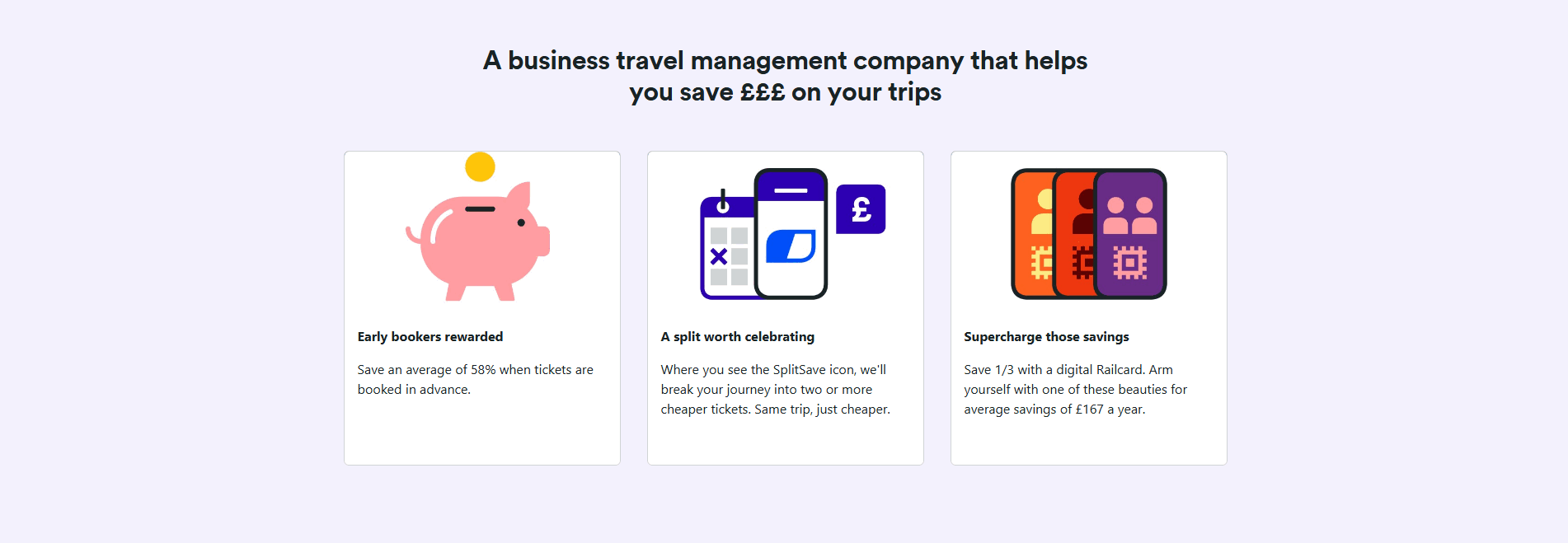
  1. 1Three quantified savings claims (58%, 1/3, 167 pounds/year) make the cost-saving promise highly credible and specific
  2. 2SplitSave mechanism explanation (break journey into cheaper tickets, same trip) demystifies a unique feature and creates curiosity
  3. 3Playful illustrations (piggy bank, app screens, railcard graphics) make each proposition visually distinct and scannable
  4. 4Each card addresses a different savings behavior (booking early, splitting, memberships) covering multiple user scenarios

Reviewed design-pattern pick from Trainline’s value proposition section.

What I love about this section

  • Three quantified savings claims (58%, 1/3, 167 pounds/year) make the cost-saving promise highly credible and specific
  • SplitSave mechanism explanation (break journey into cheaper tickets, same trip) demystifies a unique feature and creates curiosity
  • Playful illustrations (piggy bank, app screens, railcard graphics) make each proposition visually distinct and scannable
  • Each card addresses a different savings behavior (booking early, splitting, memberships) covering multiple user scenarios

Hero Spotify Premium

67/100

How Spotify Premium captures attention above the fold

Spotify Premium hero section
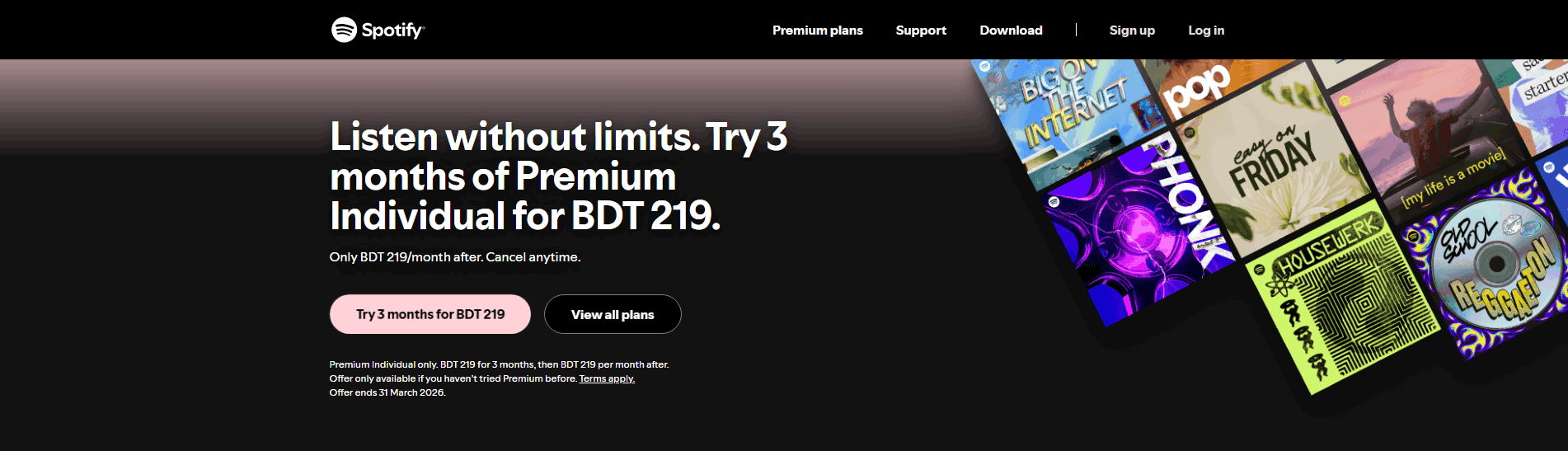
  1. 1Specific trial offer (Try 3 months for BDT 219) gives a concrete time-bound commitment with clear pricing
  2. 2Cancel anytime risk reducer removes long-term commitment anxiety for new subscribers
  3. 3Dual CTAs (Try 3 months and View all plans) let visitors choose between the offer and exploring options
  4. 4Headline (Listen without limits) promises an aspirational outcome in three simple words

Reviewed design-pattern pick from Spotify Premium’s hero section.

What I love about this section

  • Specific trial offer (Try 3 months for BDT 219) gives a concrete time-bound commitment with clear pricing
  • Cancel anytime risk reducer removes long-term commitment anxiety for new subscribers
  • Dual CTAs (Try 3 months and View all plans) let visitors choose between the offer and exploring options
  • Headline (Listen without limits) promises an aspirational outcome in three simple words

Sections community teams underuse (but visitors still look for)

Even with a strong hero, secondary sections often decide whether someone keeps scrolling, especially for community products where the value is hard to show without experiencing it.

In this dataset, How It Works tends to outperform at 88.8 while Trust is the most fragile at 18.2, suggesting many community pages invest in messaging but leave gaps in credibility and social validation that slow decisions. See how best fintech websites handle similar trust gaps in adjacent verticals.

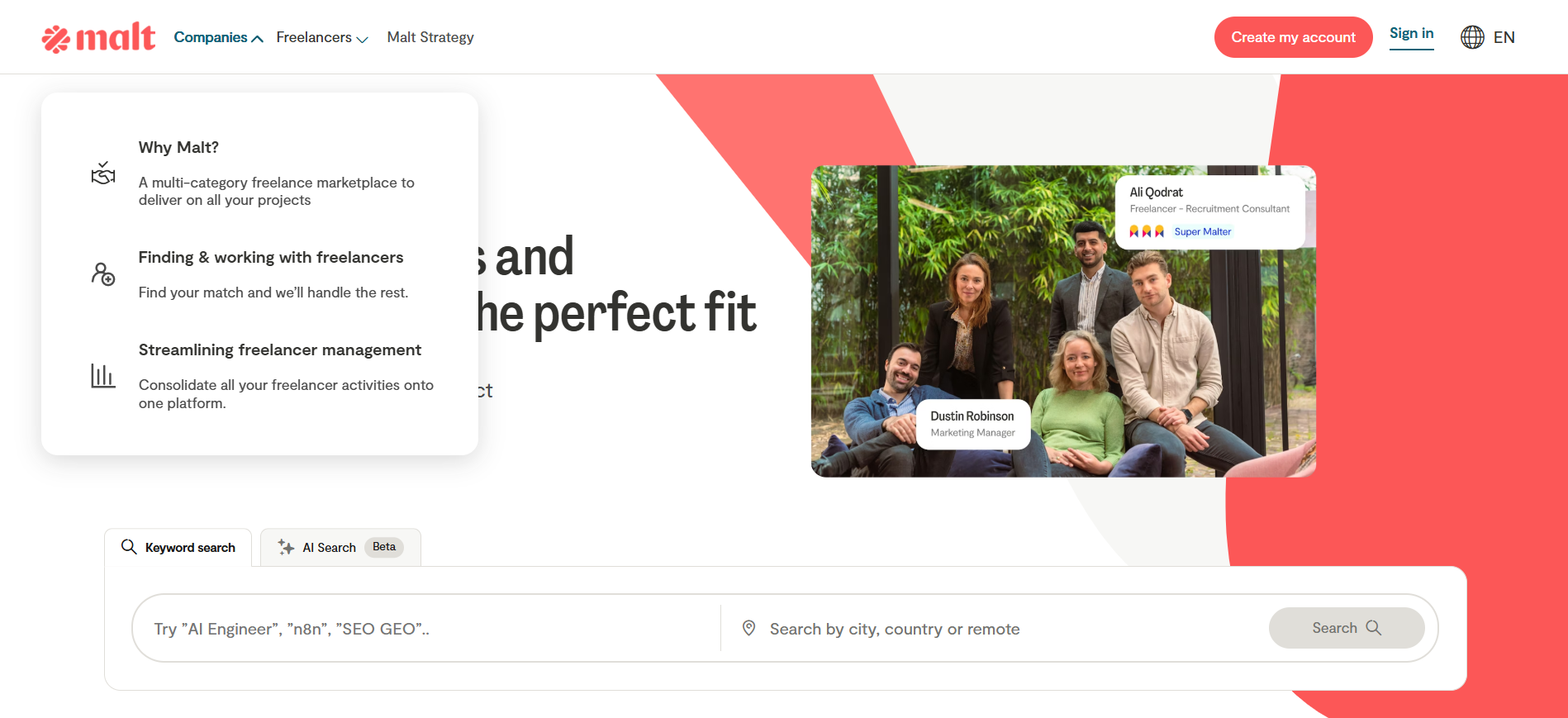
Navbar Malt

100/100

Why this navbar works

Malt navbar section
  1. 1Persona-based tabs (Companies vs Freelancers) let visitors self-select their path immediately
  2. 2Each dropdown item includes a short description explaining the value proposition clearly
  3. 3Create my account CTA uses coral color that contrasts strongly against the white navbar
  4. 4Why Malt item in dropdown addresses consideration-stage objections directly in navigation

Reviewed overlooked-section pick from Malt’s navbar section.

What I love about this section

  • Persona-based tabs (Companies vs Freelancers) let visitors self-select their path immediately
  • Each dropdown item includes a short description explaining the value proposition clearly
  • Create my account CTA uses coral color that contrasts strongly against the white navbar
  • Why Malt item in dropdown addresses consideration-stage objections directly in navigation

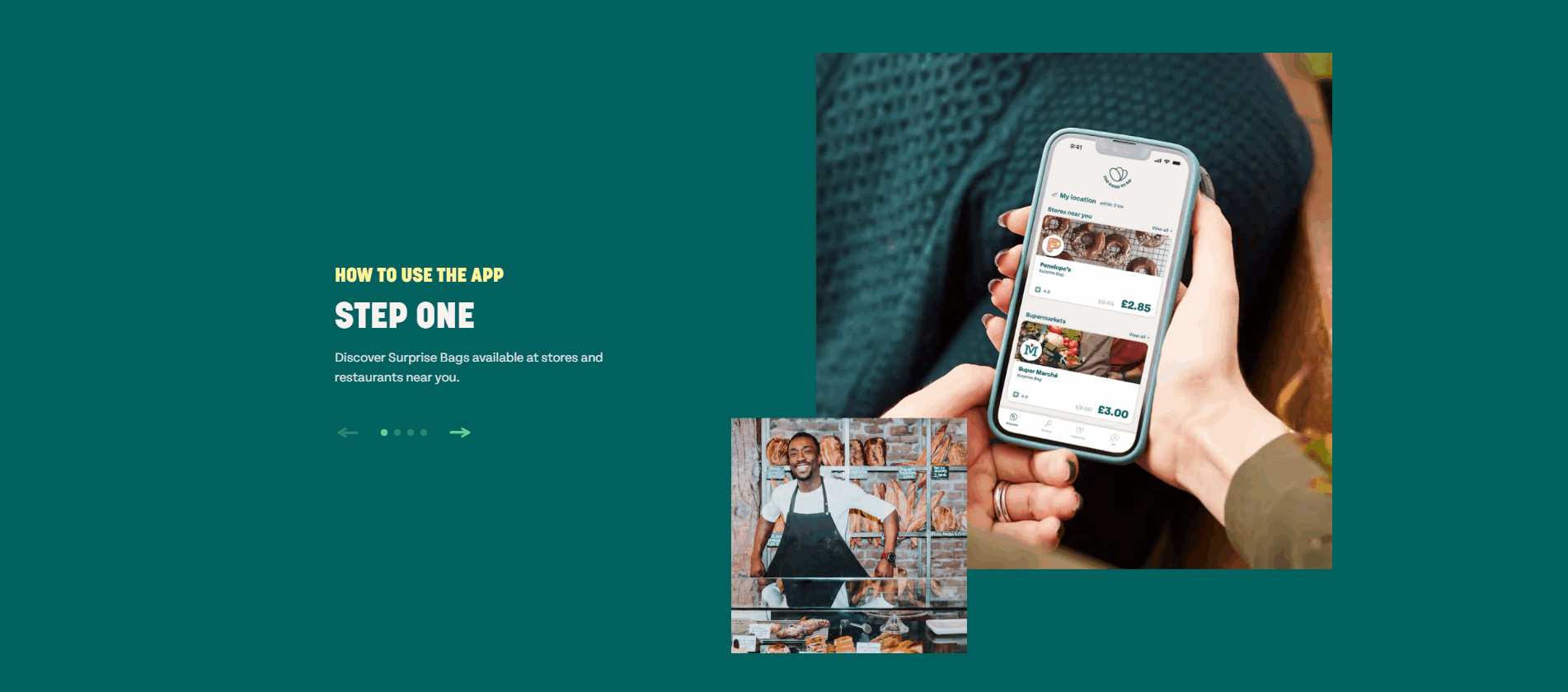
How It Works Too Good To Go

100/100

How Too Good To Go simplifies the process

Too Good To Go how it works section
  1. 1Step One label provides clear numbered sequencing for the process
  2. 2Phone mockup with real app UI makes the experience tangible and relatable
  3. 3Brief description (discover Surprise Bags near you) communicates simplicity

Reviewed overlooked-section pick from Too Good To Go’s how it works section.

What I love about this section

  • Step One label provides clear numbered sequencing for the process
  • Phone mockup with real app UI makes the experience tangible and relatable
  • Brief description (discover Surprise Bags near you) communicates simplicity

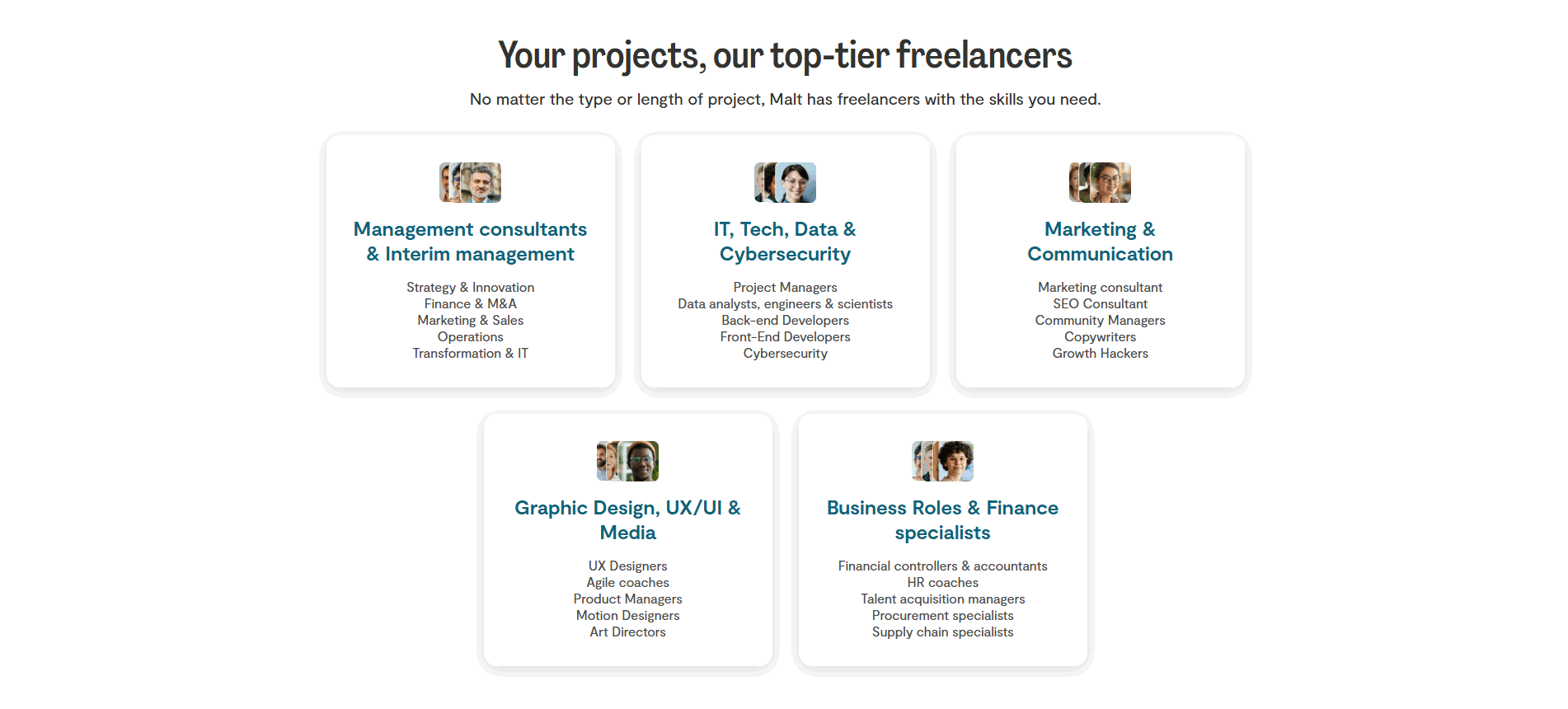
Use Cases Malt

100/100

How Malt makes the product feel relevant

Malt use cases section
  1. 1Five freelancer categories with five sub-specialties each create a comprehensive talent taxonomy
  2. 2Avatar photos on each card humanize the freelancer categories and build trust
  3. 3Your projects our top-tier freelancers headline bridges client need and talent supply
  4. 4Sub-specialty lists help buyers match their exact hiring need quickly

Reviewed overlooked-section pick from Malt’s use cases section.

What I love about this section

  • Five freelancer categories with five sub-specialties each create a comprehensive talent taxonomy
  • Avatar photos on each card humanize the freelancer categories and build trust
  • Your projects our top-tier freelancers headline bridges client need and talent supply
  • Sub-specialty lists help buyers match their exact hiring need quickly

If you are refreshing a community landing page, treat these overlooked blocks as conversion infrastructure, not filler.

How does your community homepage compare?

Five quick questions to see where your page stands against this community benchmark. For a full section-by-section audit, try our landing page analyzer.

Interactive quiz

What would your community homepage score?

Question 1 of 5
0%

Can a visitor understand what your community offers in under 5 seconds?

"Join 10,000 freelancers sharing leads and resources" beats "the platform for community."

Gabriel Amzallag

Reviewed by

Gabriel Amzallag — Founder, LPA

Worked on website and growth at scale-ups like Qonto, PayFit, and Pigment. After 5 years helping SaaS companies convert, I noticed the same homepage mistakes everywhere—so I built a benchmark to score what actually works across 60+ conversion criteria.

See how your page compares to the 48.2 community average

Run a section-by-section diagnostic on your community page and get prioritized fixes, then see how you stack up against these community website examples.

Analyze your community pageFree. Takes 2 minutes.

Explore other industries

See how conversion patterns differ across verticals. Each page scores real homepages on the same framework.

See all industries
Benchmark-backed answers for community website design

FAQ: Best Community Websites (Community Benchmarks)

Quick answers to common questions about what makes the best community websites convert, based on section-level benchmark data from this community review.

What are the best online community platforms?

[01]

The best online community platforms are the ones that make value visible before asking for commitment. In this benchmark, we scored 18 community pages on 60+ conversion criteria. The strongest performers consistently led with Single Focus (14%) and Benefit Specificity (12%), making abstract belonging feel specific and actionable.

What are the 5 C's of community?

[02]

The 5 C's of community, connection, communication, collaboration, content, and commerce, map directly to homepage structure. Across 18 community pages reviewed, the pages scoring highest made these elements concrete: Cta and Value Proposition sections translated connection and content into visible, measurable benefits rather than aspirational language.

What is replacing Facebook groups?

[03]

Dedicated community platforms are replacing Facebook groups by offering more control, better monetization, and richer member experiences. In this benchmark, the strongest pages averaged 88.8 in How It Works sections by clearly showing what the platform does differently, while Trust sections at 18.2 reveal where many platforms still fail to build trust.

What is the biggest online community?

[04]

The biggest online communities succeed because scale compounds trust. For teams using the best community websites as design benchmarks, this review compares 18 pages and shows which section types (like How It Works at 88.8), most consistently support clarity and action regardless of community size.

How do I know if my community homepage is underperforming?

[05]

Your community homepage is likely underperforming if visitors cannot quickly answer who the community is for, what they will get, and why they should trust it. If your key sections are closer to the benchmark average of 48.2 or your Trust experience is nearer to 18.2 than 88.8, it is worth running a structured teardown, start with a landing page audit.

What is the biggest design mistake on community websites?

[06]

The biggest design mistake is describing the community in abstract terms without showing what members actually experience. With an overall average of 48.2 across 18 pages reviewed, better-performing pages made Single Focus explicit and avoided burying the core value behind a weak Trust experience at 18.2.

Where can I find great community website design inspiration?

[07]

Study community website examples section by section instead of saving full-page screenshots. Browse best landing page examples for the full gallery, then drill into hero section examples, trust section examples, and pricing section examples to see what the strongest community homepages do differently at each stage of the funnel.